Picture this: it’s a cozy evening, and you’re all set to binge-watch your favorite series. You grab your popcorn, snuggle into your couch, and just as you’re about to hit “play,” your internet connection decides it’s time for a vacation. You know the feeling—frustration bubbling up, as the spinning wheel of doom taunts you. This scenario is all too common, but it doesn’t have to be your reality. Learning how to improve home internet speed can turn that dread into delight.
Recognizing the Symptoms of a Slow Internet Connection
Before we tackle solutions, it’s crucial to identify the symptoms of a slow internet connection. You might notice:
- Buffering videos
- Pages taking forever to load
- Frequent drops in connection
- Slow downloads and uploads
Most people often jump straight into troubleshooting without recognizing these signs. In my experience, it’s the symptom recognition that gives a clearer direction on how to improve home internet speed effectively.
Understanding Your Internet Plan
First things first: do you know what you’re paying for? Before making any changes, check your internet service plan to understand the speed you’re supposed to be getting. You can usually find this on your service provider’s website or your last bill. If you’re paying for speeds that are too low for your needs—say, if you enjoy gaming or streaming—upgrading your plan might be the simplest solution.
Run a Speed Test
After confirming your plan, run a speed test. Websites like Ookla’s Speedtest are great for this. Here’s what most people get wrong: they often conduct the test at a moment when their connection feels slow, but it’s important to test at different times of the day to get a comprehensive view of your internet performance.
If your results consistently fall short of what you’re supposed to be getting, you may want to reach out to your ISP to discuss options or explore enhancing your setup at home.
Optimize Your Router Placement
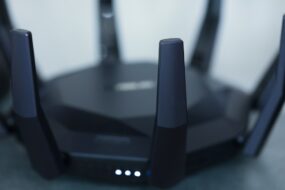
Your router’s location can significantly impact your internet speed. A common mistake is tucking it away in a corner or behind furniture. Instead, place your router in a central location, up high, and away from walls. This can increase the coverage and improve your connection.
Walls, metal objects, and electronic devices (like microwaves) can interfere with your Wi-Fi signal. Consider this: If you have a two-story house and your router’s on the first floor, chances are, the second floor may experience weak connectivity. Aim to position the router somewhere open and central, to cover as much area as possible.
Adjust Router Settings
Many people don’t realize that routers come equipped with various settings that can enhance performance. Here are a few tweaks you can consider:
- Change the Wi-Fi Channel: Wi-Fi operates on channels that can become overcrowded, especially in dense neighborhoods. Use an app like WiFi Analyzer to identify which channels are less congested and switch to one of those.
- Update Firmware: Just like apps on your phone, your router’s firmware needs timely updates. Manufacturers often release updates that can enhance performance and security. Check your router’s user manual for instructions.
- Enable Quality of Service (QoS): This feature allows you to prioritize bandwidth for specific devices or types of traffic. For example, give your gaming console or streaming device priority during peak hours.
Invest in Better Hardware
If your router is several years old, it might struggle to keep up with newer devices and higher internet speeds. Consider upgrading to a dual-band or tri-band router, which can handle multiple devices more efficiently. In my experience, investing in quality hardware can significantly boost internet connection speeds.
Also, don’t overlook your modem—especially if you’re renting from your ISP. Purchasing your modem can save you rental fees and often yield better performance as it could support higher speeds than the basic models provided by your ISP.
Limit Connected Devices
Every device connected to your Wi-Fi network consumes bandwidth. If your household has multiple devices streaming, gaming, or downloading simultaneously, it could seriously slow down your connection. To increase internet speed, try limiting devices connected to the network, particularly during high usage times.
For devices that are idle but still connected, like smart home devices or IoT gadgets, consider turning off Wi-Fi access when they’re not in use. This can help free up bandwidth for your more demanding activities, like streaming or online gaming.
Utilize Wired Connections Where Possible
While Wi-Fi offers convenience, wired connections provide more stability and speed. If you’re serious about improving your internet experience—especially for gaming or streaming—consider using an Ethernet cable for your console or PC. Not only will this boost your internet speed, but it’ll also deliver a more reliable connection without the drops that often come with Wi-Fi.
Contact Your ISP for Help
If you’ve tried everything and you’re still facing slow speeds, reach out to your Internet Service Provider. Sometimes, issues that seem like a home network problem could stem from the ISP side. They can run diagnostics and offer tailored advice to improve your home internet speed.
In some cases, there could be ongoing maintenance in your area or they might have the records of frequent service disruptions affecting your connection. Getting in touch can often uncover issues you weren’t aware of.
Consider a Wi-Fi Extender or Mesh Network
If your home suffers from dead zones or weak signals in certain areas, investing in a Wi-Fi extender or a mesh network might be your best bet. Wi-Fi extenders boost your existing signal to reach those hard-to-access spots, while a mesh network creates a more cohesive network with multiple points of connection for consistent coverage across larger areas.
These options can especially come in handy in larger homes where thick walls or multiple floors create barriers to a strong signal. They might require some investment, but the return in speed and connectivity is often worth it.
Final Thoughts
Improving your home internet speed can seem daunting, but with a few tweaks and some mindful practices, it’s definitely achievable. It’s all about knowing how to improve home internet speed effectively by understanding your needs, adjusting your hardware and settings, and sometimes collaborating with your ISP. Follow these home Wi-Fi tips, and soon you’ll find yourself streaming, gaming, and browsing without a hitch. When in doubt, remember that sometimes the simplest solutions can have the biggest impact. Here’s to a faster, more enjoyable internet experience!