If you’ve ever found yourself standing in the middle of your living room, waving your phone around like a metal detector, trying to find that one sweet spot for a decent internet connection, you’re not alone. Many of us have been there, frustrated by weak Wi-Fi signal strength that seems to disappear just when you need it most. Whether it’s buffering during a movie night or lagging during a crucial video call, a weak Wi-Fi signal can be incredibly annoying. So, how can you improve home Wi-Fi signal strength and enjoy a better internet connection? Let’s dive into some practical tips.
Understand Your Wi-Fi Obstacles
Before diving into the solutions, let’s first identify the common culprits of poor Wi-Fi signal. Understanding these can help you improve home Wi-Fi signal strength more effectively. Here are a few factors to consider:
- Distance: The farther you are from your router, the weaker the signal. Walls, floors, and furniture can all absorb or block the signal.
- Interference: Other electronic devices, like microwaves or cordless phones, can interfere with Wi-Fi signals, especially if you’re using the 2.4 GHz band.
- Number of devices: More devices on your network can slow down your Wi-Fi, affecting performance significantly.
- Router placement: Where you place your router can make a huge difference. If it’s hidden away in a corner, that could be part of your problem.
Identifying these obstacles gives you a clear starting point to make the necessary adjustments. In my experience, many people overlook the placement of their router and where they actually use their devices most!
Optimal Router Placement
One of the simplest yet most effective ways to improve home Wi-Fi signal strength is by optimizing the placement of your router. Here are some tips:
- Central Location: Your router should be placed in a central location of your home, ideally elevated on a shelf or high surface. This allows the signal to reach all areas more evenly.
- Away from Obstacles: Keep your router away from walls, furniture, and metal objects that can block the signal. A clear line of sight improves performance.
- Proper Height: Positioning the router higher increases its range; signals typically travel better downwards than upwards.
These changes may seem minor, but they can significantly boost your Wi-Fi signal. I’ve seen friends move their routers from a cluttered corner to a high shelf, and voila—instant improvements!
Update Your Router
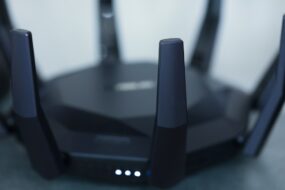
Sounds obvious, right? But many people forget that not all routers are created equal. An outdated router won’t give you the performance you need, especially if you have newer devices. Here’s how to approach updating your router:
- Check Your Model: If your router is more than five years old, it might be time for an upgrade. Newer models support more devices and offer better speed.
- Firmware Updates: Sometimes, you don’t need to buy a new router; just updating the firmware can enhance performance. Check your router’s settings or the manufacturer’s website for instructions.
Many people don’t realize that a boost in technology can provide a significantly better internet connection. I often recommend checking out user reviews to find a router that suits your needs!
Consider Wi-Fi Extenders or Mesh Systems
If you’ve tried everything, yet still struggle with weak spots in your home, a Wi-Fi extender or a mesh system could be your solution. Here’s the difference:
- Wi-Fi Extenders: These devices amplify your current signal, extending the coverage area. They’re relatively inexpensive and easy to install.
- Mesh Wi-Fi Systems: These systems consist of multiple nodes that work together to blanket your home in Wi-Fi. They’re generally more efficient and easier to manage than extenders.
Choosing between them often depends on your home’s size and layout. If you live in a large house, a mesh system may prove to be more effective for improving your home Wi-Fi signal strength. I’ve seen people dramatically change their online experience after making the switch to a mesh network.
Optimize Your Wi-Fi Settings
Sometimes, the answer lies not in your hardware but in how you configure your settings. Here’s how to optimize your Wi-Fi settings:
- Change Your Channel: Wi-Fi networks operate on different channels. If many neighboring networks are using the same channel, it could cause interference. Switch to a less crowded channel through your router settings.
- Use 5 GHz Band: If your router supports dual-band technology, switch to the 5 GHz band for faster speeds and less interference, especially for devices close to the router.
- Enable Quality of Service (QoS): QoS settings prioritize bandwidth for specific devices or applications, which can enhance your streaming or gaming experiences.
It’s true that many people don’t bother exploring these settings. In my opinion, spending a little time in your router’s configuration can make a noticeable difference.
Limit Connected Devices
Every connected device uses a portion of your bandwidth, which can slow down your connection. If multiple devices are hogging the Wi-Fi, you might deal with frustratingly slow speeds. Here’s how to take control:
- Disconnect Unused Devices: Regularly check which devices are connected to your network and disconnect those that aren’t in use.
- Set Rules: If you have kids, consider setting rules about device usage, especially during peak times like family movie nights or video game sessions.
Managing your connected devices might involve some compromise, but it could dramatically enhance your Wi-Fi experience.
Regular Maintenance
Just like your car or your home, your Wi-Fi network requires maintenance too. Here are some routine actions that can help:
- Restart Your Router: Regularly restart your router to clear memory and resolve issues. It’s like giving it a little refresh! Aim for once a month.
- Secure Your Network: Ensure your network is password-protected to prevent unauthorized use. An open network can lead to slow speeds.
- Monitor Your Network: There are apps and tools available that allow you to monitor your network’s performance. Keeping tabs can help you quickly identify issues.
Most people forget to maintain their routers, thinking they’re set it and forget it. In my experience, regular maintenance can stave off many potential problems.
Conclusion
Improving your home Wi-Fi signal strength doesn’t have to be an overwhelming task. By assessing your environment, updating your hardware, optimizing your settings, and maintaining your system, you can enjoy a better internet connection throughout your home. Remember that every little change counts, so don’t hesitate to test out these tips. You might just find that perfect spot to stream your favorite shows without a hitch!
What has worked for you in improving your home Wi-Fi signal strength? I’d love to hear your experiences or any additional tips you might have!